

For beginners and busy professionals

Finally feel confident using Google’s AI, without the guesswork

Follow along step by step and turn Gemini into the helper that speeds up your writing, research and everyday tasks.

Yes! Get Instant Access

One-time $17 · 14-day money-back guarantee

You’ll learn to useSettings & privacyPersonal IntelligenceScheduled ActionsImages & infographicsVideoLyria musicGoogle DocsSlidesGemsOpal super GemsGemini NotebookGuided Learning
What changes for you

Spend less time stuck and more time getting things done

Know where to click, get faster help with writing, research and images, and stop worrying every time Google moves a menu.

What’s inside: 22 comprehensive lessons on Google’s AI assistant. Watch each step on screen and follow along. Settings, chat tools, image and video creation, Gems, Gemini Notebook (formerly NotebookLM), and more.

22comprehensive lessons
3free bonuses
84page PDF guide
14day guarantee
A woman learning on her laptop at home
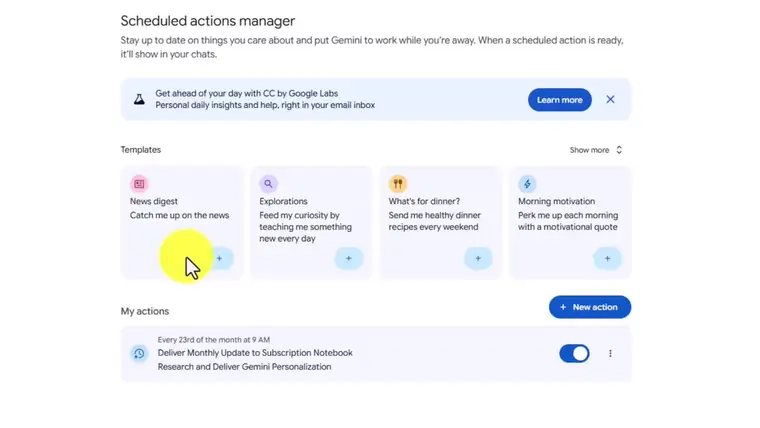
Lesson screen: the Scheduled actions manager
Scheduled Actions Reusable Gems Music with Lyria
What you get

Everything you need to use Gemini with confidence

Google keeps adding new things, and menus move. Gemini 101 is a plain, organized walk-through, with one feature per lesson.

Follow along, one step at a time

Know where each feature is, what it does, and how to use it. Every lesson shows the steps on screen so you can follow along at your own pace.

Lesson screen: Scheduled actions manager

Create images & infographics

Right inside a chat.

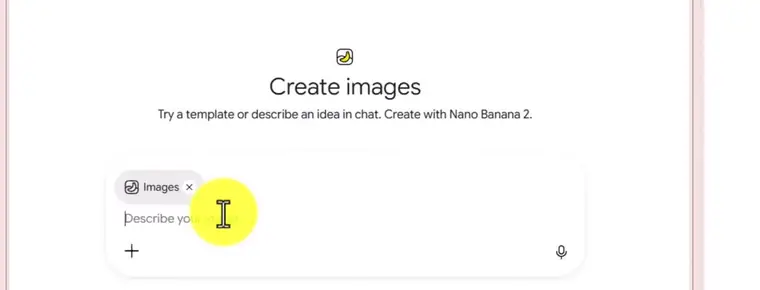
Lesson screen: Create images

Make your own music

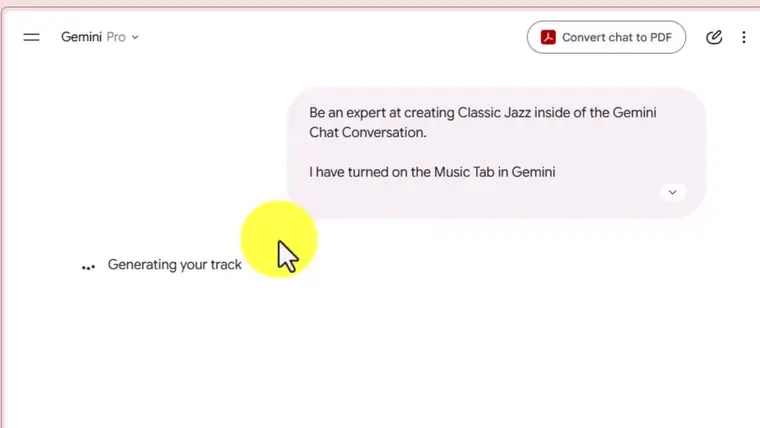
Create an original track with Lyria.

Lesson screen: generating a music track

Stop repeating yourself

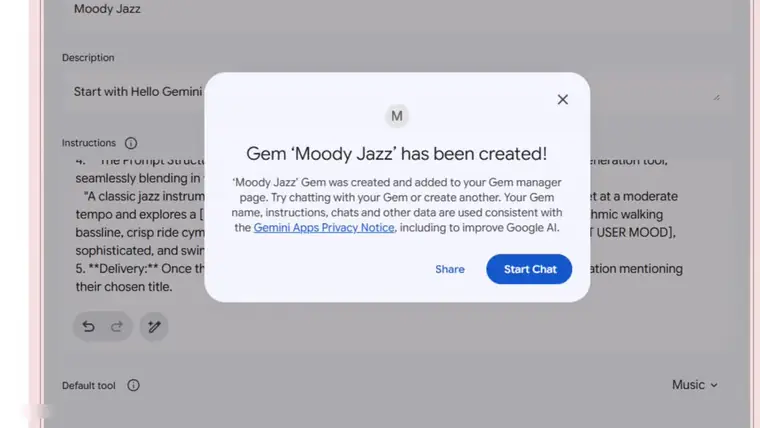
Turn a task you repeat into a reusable Gem, then use it again and again. There’s even a “super Gem” lesson built with Opal.

Lesson screen: a Gem has been created

No surprises mid-project

Understand usage limits before you hit them.

Stay in control of your privacy

Start with Settings and control what Gemini saves about your activity.

Finished docs and slides

Send results straight to a Google Doc or turn them into Slides.

Work with your own files

Upload files and use them in Gemini Notebook (formerly NotebookLM).

Smiling woman learning at her laptop
Learn your way

Learn at your own pace, on any device

Watch the lessons in order or skip to the topic you need.

  • Learn in short sessions22 comprehensive lessons, so you start in the right place.
  • Start right away, watch anywhereOn a computer, tablet or phone. Right after checkout you’ll get an email with your login to the Lantern Waste Academy member area.
  • Look things up without rewatchingThe Quick-Reference Guide summarizes all 22 lessons in writing.

Get Gemini 101 for $17

What you’ll learn

Sixteen things you’ll be able to do

  • Find your way around Settings and control what Gemini saves about your activity
  • Turn on Personal Intelligence and bring context in from your other chats
  • Understand usage limits so you aren't surprised mid-project
  • Set up Scheduled Actions so Gemini runs recurring tasks for you
  • Share a chat as a public link
  • Create images and simple infographics right inside a chat
  • Make a short video with Gemini
  • Use the Library menu and the Gemini Notebook (formerly NotebookLM) notebook interface
  • Use the new options in the individual chat menu
  • Create an original music track with Lyria
  • Send results straight to a Google Doc or turn them into Slides
  • Turn a task you repeat into a reusable Gem
  • Try a "super Gem" built with Opal
  • Upload files and work with them in Gemini Notebook (formerly NotebookLM)
  • Create Google's official prompt guide and use it to write better prompts
  • Learn any topic step by step with Guided Learning
Curriculum

From first click to confident, in four modules

22 comprehensive lessons.

1

Getting Started with Gemini

Get set up safely and know your way around.

6 lessons

  • Setting Up Your Activity and Privacy Settings
  • Personal Intelligence: Teaching Gemini About You
  • Importing Information from Other Chats
  • Adding Your Avatar
  • Understanding Usage Limits
  • Getting Help Inside Gemini
2

Working Smarter in Your Chats

Make every chat work harder for you.

5 lessons

  • Branching Conversations
  • New Tools in the Chat Menu
  • Sharing Chats as Public Links
  • Scheduled Actions: Let Gemini Work on a Timer
  • The Library Menu
3

Creating with Gemini

Turn ideas into images, video, music, documents and slides.

5 lessons

  • Creating Images and Infographics
  • Creating a Video with Gemini
  • Creating a Music Track with Lyria
  • Delivering Documents as a Google Doc
  • Creating Slides
4

Gems, Notebooks and Power Tools

Reuse what works, work with your own files, and learn any topic step by step.

6 lessons

  • Turning Repeat Tasks into a Gem
  • Using a Super Gem (Opal) Application
  • The Gemini Notebook (formerly NotebookLM) Notebook Interface
  • File Uploads and Gemini Notebook (formerly NotebookLM)
  • Creating an Official Google Prompt Guide
  • Mastery with Gemini Guided Learning
Compare

Skip the guesswork: Gemini 101 vs. figuring it out on your own

What you getGemini 101On your own
An organized, step-by-step path through GeminiYesScattered across many sources
Each lesson covers one feature: where it is, what it does, how to use itYesVaries from video to video
Every step shown on screen, over the shoulderYesVaries
84-page Quick-Reference Guide (PDF)YesNot usually included
The full course as MP3 audioYesNot usually included
Lesson transcripts and caption filesYesNot usually included
14-day money-back guaranteeYesNot usually included
Who it’s for

Find yourself here? Gemini 101 is for you

Woman relaxing with a laptop and a cup of tea

Know what to do nextFor beginners who have opened Gemini and weren’t sure where to start

Man taking notes beside his laptop

Save timeFor professionals who want help with writing, research and recurring tasks

Two shop owners looking at a tablet

Build reliable routinesFor small business owners who want a few dependable workflows

Woman working on her laptop with headphones

Create more from one toolFor creators who want images, video, music and slides

Who it’s NOT for: advanced developers looking for API or coding training.

Free bonuses

Three free extras to keep you learning

Bonus 1

Look things up without rewatching

Gemini 101 Quick-Reference Guide (PDF, 84 pages): a written summary of all 22 lessons.

Bonus 2

Learn on the go

The full course as MP3 audio. Listen while you drive, walk or do chores.

Bonus 3

Read along or search a topic

Lesson transcripts and caption files. Keep them for reference.

An Honest Note

Gemini changes often. These lessons show the interface as it was when they were recorded, so a button may have moved by the time you watch. The concepts and steps still apply, and the Quick-Reference Guide helps you find your way.

Get started

Start using Gemini with confidence for $17

Gemini 101 comes with instant access and all three bonuses.

Lantern Waste Academy sealGemini 101 course cover

Gemini 101

Learn Google Gemini step by step, with 22 comprehensive lessons.

$17one-time payment
  • 22 comprehensive lessons
  • Bonus 1: Quick-Reference Guide (PDF, 84 pages)
  • Bonus 2: The full course as MP3 audio
  • Bonus 3: Lesson transcripts and caption files
  • Watch on a computer, tablet or phone
Yes, I Want Gemini 101
14-Day Money-Back GuaranteeIf Gemini 101 isn’t useful to you, email us at [email protected] within 14 days and we’ll refund your $17.

One-time payment. Personal-use license. Secure checkout.

FAQ

Questions, answered

Do I need a paid Gemini plan?

No. Most lessons work with a free Google account. Some features (for example video generation, higher usage limits, or features that are still rolling out) may need a paid Google AI plan or may not be available in your region yet.

How long is the course?

22 comprehensive lessons. Watch them in order or skip to the topic you need.

How do I access it?

Right after checkout you'll get an email with your login to the Lantern Waste Academy member area. You can watch on a computer, tablet or phone.

Can I download the bonuses?

Yes. The PDF guide, the MP3 audio and the transcripts can be downloaded from inside the course.

Can I resell or share the course?

No. Your purchase is a personal-use license for you only. Please don't share, resell or redistribute the videos or bonuses.

Is this an official Google product?

No. Lantern Waste Academy is independent and not affiliated with or endorsed by Google. Gemini, Gemini Notebook (formerly NotebookLM) and related names are trademarks of Google LLC.

What if I need help?

Visit LanternWasteAcademy.com/support or call 267.609.5836.

Lantern Waste Academy seal

Start using Gemini with confidence today. Get Gemini 101 for $17, with instant access and all three bonuses.

Yes, I Want Gemini 101

One-time payment. Personal-use license. Secure checkout.

© 2026 Lantern Waste Academy. Not affiliated with Google LLC.

Results vary; this course teaches software use and makes no promises about income or earnings.